

注意⚠️
1. 本教程内容,仅限于阶段性使用,版本更新后可以直接设置;
2. 程序搭建环境存在差异,使用前需慎重评估,教程只供学习,不对使用后果负任何连带责任。
3. 转载,请注明出处!
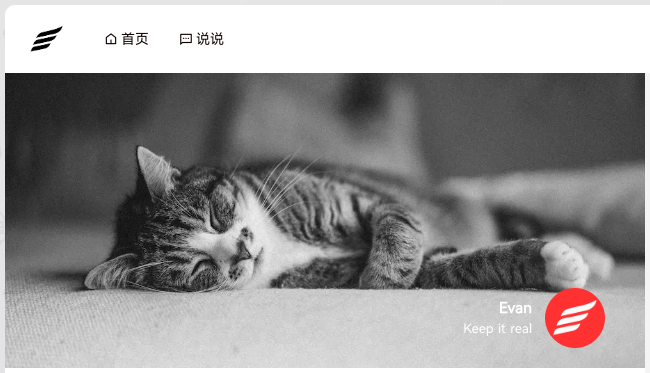
一、封面元素修改
- 后台:外观 ➤ 自定义 ➤ 额外CSS
- 直接把下面的代码粘贴进去即可(信息都改成自己的)
/* 临时改封面 */
img[src*="banner.jpg"],
img[data-src*="banner.jpg"] {
    content: url('https://000.COM/xxx.webp') !important;
    width: 100% !important;
    height: 100% !important;
}
/* 1. 替换文字:MICAH → Evan */
.info .name {
    visibility: hidden;
    position: relative;
}
.info .name::after {
    content: 'Evan';
    visibility: visible;
    position: absolute;
    right: 0;
    top: 50%;
    transform: translateY(-50%);
}

/* 2. 替换文字:Born for design → Keep it real */
.info .des {
    visibility: hidden;
    position: relative;
}
.info .des::after {
    content: 'Keep it real';
    visibility: visible;
    position: absolute;
    right: 0;
    top: 50%;
    transform: translateY(-50%);
    white-space: nowrap;
}

/* 3. 替换头像 */
.ava img,
.ava img[src*="ava.png"],
.ava img[data-src*="ava.png"] {
    content: url('https://000.COM/avatar.png') !important;
    width: 60px !important;
    height: 60px !important;
    border-radius: 50% !important;
    object-fit: cover !important;
}
二、边栏板块距离调整
.wid-p {
  margin-bottom: -10px;
}三、边栏评论板块宽度调整
ol, ul {
    padding-left: 0;
}
四、隐藏右上角搜索和发布
.cls-search.item,
.cls-publish.item {
    display: none !important;
}
© 2026 EVAN.XIN · Attribution Required
吴蛋蛋
主题有新功能是好事
似水流年
最终从单用户走向了多用户啊。
Evan
@似水流年 确实。pixpro更像是一个“综合体”,扩展了很多的多用户功能,已经不是单纯的播客主题了。
小王先森
为啥不用我这个开源的moments
obaby
开发的新主题吗?看了前面的文章还有php加密技术,感觉挺复杂的。
Evan
@obaby 嗯。Pix作者新出的主题,不过已经不是单纯的博客主题了,增加了很多功能。